Ai generator free 9 Best image tools
Unleashing the Power of Accessible AI Artistry
Have you ever stared at a blank screen, a creative vision burning in your mind but no way to bring it to life? What if you could generate breathtaking, original artwork in seconds, without any artistic training or a hefty software budget? This is the new reality powered by ai generator free technologies. The demand for custom visuals is exploding; by 2025, it’s projected that over 30% of outbound marketing messages from large organizations will be synthetically generated, a significant leap from less than 2% in 2022. This seismic shift isn’t just for enterprises with deep pockets.
A new wave of sophisticated, cost-free AI image tools is democratizing design, empowering bloggers, marketers, and small business owners to create professional-grade graphics at an unprecedented speed. In this comprehensive guide, we will explore the top free AI image generators, dissect the core frameworks that make them tick, and provide you with actionable workflows to get remarkable results fast.
The Core Framework of Top-Tier AI Image Generators
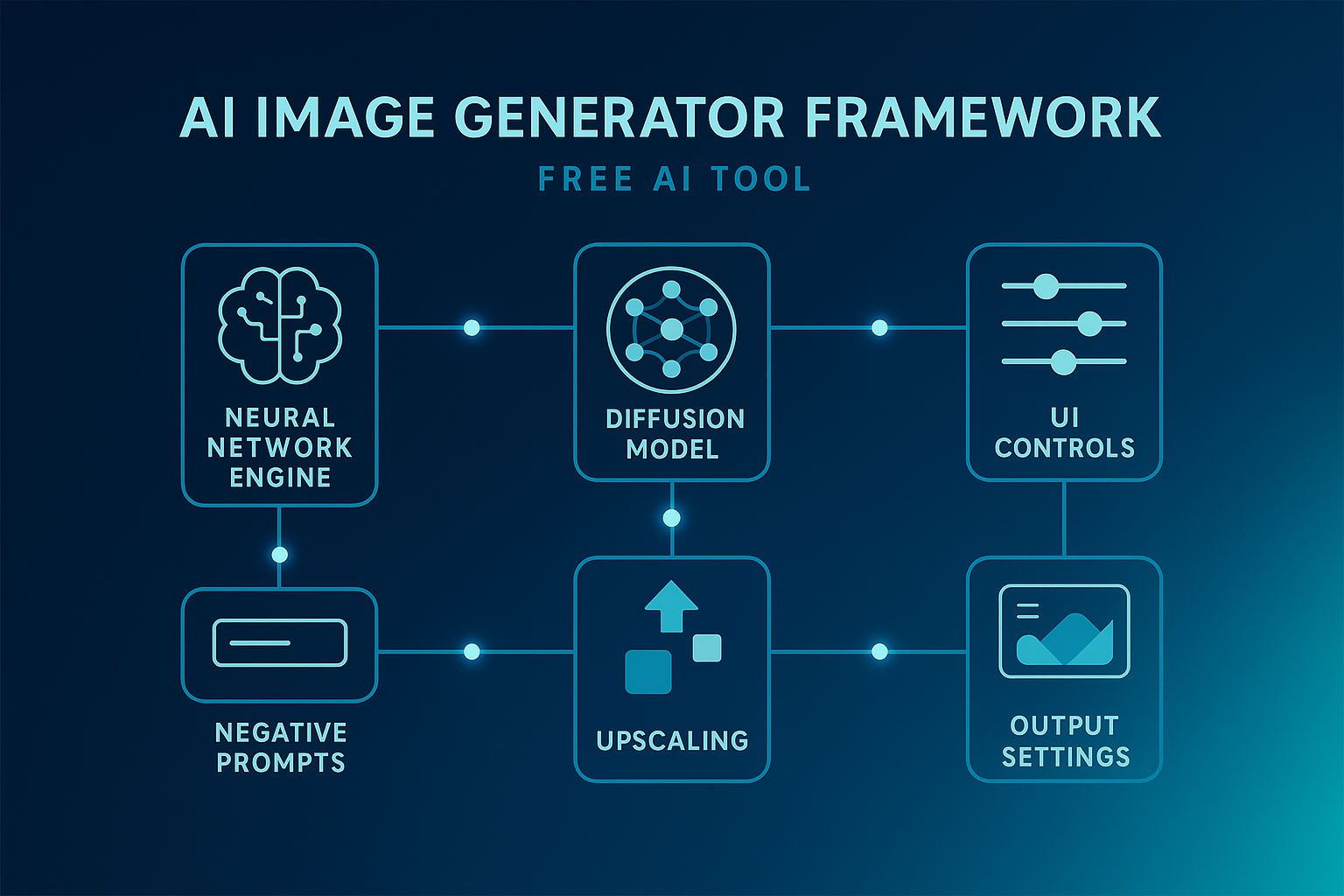
What separates a basic AI doodler from a powerhouse ai image generator free tool? It’s not magic; it’s a sophisticated architecture built on a few key components. Understanding this framework helps you choose the right tool and use it more effectively.
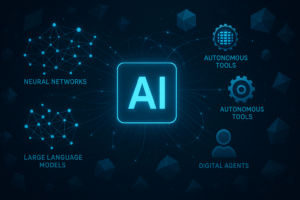
- The Neural Network Engine: At the heart of every tool is a model, often a Diffusion Model (like Stable Diffusion) or a Generative Adversarial Network (GAN). These models have been trained on millions of image-text pairs, learning the complex relationships between language and visual concepts.
- The User Interface (UI) & Experience (UX): A clean, intuitive interface is crucial for a fast workflow. The best free ai art generator platforms offer features like negative prompting, style presets, and in-painting (editing specific parts of an image) without a steep learning curve.
- Computational Backend: This is the raw processing power in the cloud that crunches the numbers to generate your image. Free tiers are often limited by “compute credits” or queue times, which is the trade-off for not paying.
- Output Customization: Control over aspects like image dimensions, aspect ratio, and the number of outputs is essential for tailoring the result to your specific needs, whether it’s a blog header or a social media post.
| Component | Why It Matters | What to Look For in a Free Tool |
|---|---|---|
| AI Model | Determines artistic style, coherence, and prompt understanding. | Access to latest Stable Diffusion or proprietary models (e.g., DALL-E, Midjourney-like). |
| User Interface | Dictates speed and ease of use. | Negative prompting, image-to-image, upscaling, and intuitive controls. |
| Computational Power | Affects generation speed and output resolution. | Generous daily free generations and fast processing times. |
| Output Rights | Defines how you can use the generated images. | Clear commercial-use license for free-tier images. |
The Evolution of Free AI Art: A Quick Timeline
The landscape of ai image generator free tools is moving at lightning speed. Understanding this trajectory helps contextualize the power now at your fingertips.
- 2021-2022 (The Dawn): The first widely accessible models emerged, but they were often research-focused, required technical know-how to run, or produced lower-fidelity, sometimes bizarre results. The concept of a user-friendly free ai art generator was nascent.
- 2023 (The Democratization): Platforms like Leonardo.Ai and Bing Image Creator (powered by DALL-E) brought powerful models to the masses through simple web interfaces. Free tiers became a standard customer acquisition model.
- 2024-Present (The Refinement & Specialization): We are now in an era of heightened competition. Tools are no longer just about generating an image; they are about entire workflows—offering in-built editing, upscaling, and brand consistency features even on free plans. The focus is on speed, quality, and control.
- 2025+ (The Integration): The future points toward seamless integration. We predict the best ai generator free tools will become plug-and-play modules within larger content suites, directly integrated into tools like Canva, WordPress, and social media schedulers.
The 9 Best Free AI Image Generators to Use Right Now
After testing dozens of platforms, we’ve curated a list of the top performers that offer robust free tiers. These are the tools that deliver the most value without requiring your credit card.
1. Leonardo.Ai
A powerhouse for those who love control. Leonardo stands out by giving free users access to numerous fine-tuned models and LoRAs (Low-Rank Adaptations), allowing you to generate images in specific artistic styles.
- Best For: Game assets, character design, and high-style art.
- Free Tier: 150 credits per day, which regenerates daily.
2. Bing Image Creator
Perhaps the easiest entry point, this Microsoft product is powered by a advanced version of DALL-E. It’s deeply integrated into the Edge browser and requires only a Microsoft account.
- Best For: Speed, ease of use, and general-purpose imagery.
- Free Tier: “Boosts” for faster generation, which reset weekly.
3. Canva AI (Text to Image)
The ultimate tool for practicality. If you’re already designing in Canva, its built-in ai generator free tool is a no-brainer. It generates images that fit perfectly into your existing designs.
- Best For: Social media managers, bloggers, and non-designers.
- Free Tier: A limited number of generations per day for free users.
4. Stable Diffusion WebUI (via platforms like Mage.Space)
For the purist who wants maximum control. While running the full WebUI yourself requires a powerful GPU, platforms like Mage.Space offer a hosted version with a generous free plan.
- Best For: Experimental artists and those who want to tweak every setting.
- Free Tier: Mage.Space offers a limited number of fast generations.
5. Playground AI
A fantastic all-rounder with a social media-like feed for inspiration. It offers a great balance of ease of use and advanced features like filters and style prompts.
- Best For: Daily content creation and inspiration.
- Free Tier: Up to 1,000 images per day.
6. NightCafe Creator
One of the oldest and most community-driven platforms. NightCafe offers multiple models (Stable Diffusion, DALL-E) and unique algorithms, all accessible through a credit system.
- Best For: Community challenges and trying different artistic techniques.
- Free Tier: 5 credits per day + earning more through community engagement.
7. Clipdrop by Stability AI
The king of AI-powered image editing. While its text-to-image is solid, Clipdrop truly shines with tools like “Reimagine,” background removal, and image upscaling, all available for free in limited capacities.
- Best For: Editing and refining existing images with AI.
- Free Tier: A set number of free operations per week.
8. CF Spark
A user-friendly mobile and web app designed for quick, beautiful creations. It’s less about technical control and more about aesthetics and speed.
- Best For: Mobile users and quick social media visuals.
- Free Tier: A limited number of daily prompts.
9. Picsart AI Image Generator
Similar to Canva, Picsart has integrated a powerful ai image generator free tool directly into its all-in-one photo editing suite.
- Best For: All-in-one editing and generation on mobile or web.
- Free Tier: A quota of free generations.
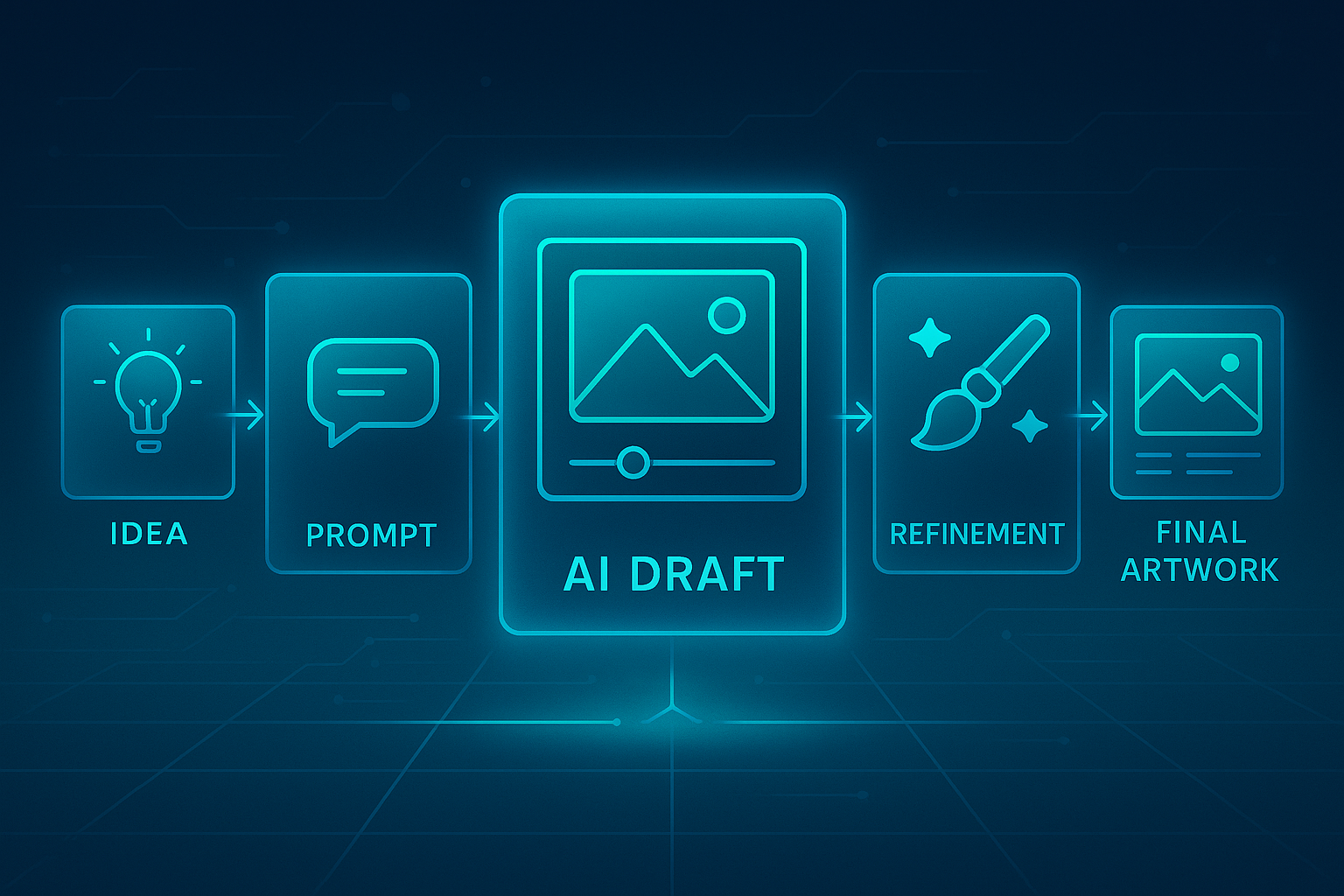
Step-by-Step: How to Get High-Quality Results from Any Free AI Generator
Getting a masterpiece from a free ai art generator isn’t just about typing a few words. It’s a craft. Follow this strategic process.
Step 1: Define Your Intent with Crystal Clarity
Before you touch a keyboard, know what you want. Is it a photorealistic product shot? A whimsical illustration? A minimalist icon? Defining the subject, style, and mood is 80% of the battle.
Step 2: Craft a Detailed, Multi-Layered Prompt
This is the critical step. Don’t just say “a dragon.” Build a rich prompt.
- Subject: “A majestic, bio-luminescent dragon”
- Action/Setting: “peacefully coiled around a crystal spire in a misty, ethereal forest”
- Style & Artist References: “in the style of Studio Ghibli, fantasy art, concept art”
- Technical Details: “sharp focus, cinematic lighting, hyper-detailed, 8K”
Step 3: Utilize Negative Prompts
Most advanced ai generator free tools have a negative prompt box. Use it to tell the AI what not to include. For our dragon: “blurry, cartoonish, wings, text, signature, watermark.” This cleans up the image significantly.
Step 4: Iterate and Refine Relentlessly
Your first result is a starting point, not the finish line. Use the image-to-image feature to rerun a good result with small prompt tweaks like “more glow,” “different angle,” or “brighter colors.”
Step 5: Upscale and Final Touches
Once you have a winner, use the tool’s built-in upscaler (or a dedicated free tool like Upscale.media) to increase the resolution for a professional, crisp finish.
Measuring the Impact: Why This Matters for Your Workflow
Integrating a free ai image generator isn’t just a novelty; it’s a quantifiable efficiency boost.
- Speed: Reduce image creation time from hours (or days, if outsourcing) to minutes.
- Cost: Slash budget allocated for stock photo subscriptions or freelance designers.
- Originality: Achieve 100% unique visuals that no competitor has, improving brand recognition.
- Content Velocity: Increase your output of visual content for blogs and social media, a key driver of engagement.
Advanced Optimization Strategies for Power Users
To truly master the ai generator free ecosystem, move beyond the basics.
- Prompt Chaining: Generate a base image, then use that image as the input for a new prompt to refine or alter it in specific ways.
- Model Mixing: On platforms like Leonardo.Ai, don’t just stick to one model. Experiment with different models for the same prompt to discover surprising stylistic variations.
- Integrate with Traditional Editors: Use your AI-generated image as a base layer in a free tool like GIMP or Photopea. Then, add text, combine elements, or adjust colors manually for a completely custom result.
Real-World Use Cases & Industry Applications
The application of ai image generator free tools is virtually limitless.
- Digital Marketing: Create endless variations of ad creatives for A/B testing without extra cost.
- Blogging & Content Creation: Generate perfect featured images, custom illustrations, and infographics that match your article’s tone perfectly.
- Game Development & Worldbuilding: Rapidly prototype characters, environments, and items to visualize concepts before commissioning final art.
- E-commerce: Produce lifestyle and contextual images for products, especially for items that are hard to photograph.
Common Pitfalls and How to Avoid Them
New users often make these mistakes. Steer clear to save time and frustration.
- Vague Prompts: The Pitfall: “a happy businessperson.” The Solution: “A confident middle-aged South Asian woman in a modern office, smiling genuinely at the camera, wearing a sleek blazer, professional photo, soft natural lighting.”
- Ignoring Composition: Specify the shot type! “close-up,” “wide angle,” “low-angle shot.”
- Giving Up Too Early: AI generation is probabilistic. The 10th or 15th variation might be the masterpiece.
How to Maintain and Scale Your AI-Generated Asset Library
As you generate more images, organization becomes key.
- Create a Prompt Library: Save your most successful prompts in a document with the resulting image. This becomes your proprietary style guide.
- Track Usage Rights: Always double-check the licensing terms for each tool’s free tier to ensure commercial use is permitted.
- Future-Proofing: The field evolves fast. Periodically revisit this list and test new tools to ensure you’re always using the most capable free ai art generator available.
Conclusion: Your Creative Power, Amplified and Unleashed
The barrier between your imagination and stunning visual reality has been demolished. The sophisticated ai generator free tools available today are not just toys; they are legitimate creative partners that can supercharge your productivity and brand identity. We’ve walked through the core technology, the top 9 platforms, and a proven, step-by-step process to get exceptional results quickly. The only step left is to take action. The fusion of human creativity and AI efficiency is the future of content creation, and that future is now freely accessible to you.
Frequently Asked Questions (FAQs)
1. Are images from free AI generators really copyright-free?
Most platforms grant you a license to use, modify, and even commercialize the images you generate. However, always review the specific Terms of Service for the tool you are using, as policies can differ.
2. Why do my AI-generated images sometimes have distorted hands or text?
This is a common issue as AI models struggle with the complex, structured geometry of hands and language. Using negative prompts like “deformed hands, bad anatomy” and iterating can help. Upscalers also sometimes fix minor distortions.
3. What’s the catch with free tiers?
The primary limitations are generation speed (queues), daily credit limits, and sometimes lower output resolution or a watermark. These tiers are designed to entice you into their paid, more powerful plans.
4. Can I use these AI images on social media platforms like Instagram?
Absolutely. In fact, they are perfect for creating a consistent and unique feed. Just ensure your chosen tool’s license permits social media use.
5. Which free AI generator is best for photorealistic images?
For pure, effortless photorealism, Bing Image Creator (DALL-E) is a top contender. For more controlled realism with specific lighting and composition, Leonardo.Ai with the right model is excellent.
6. How can I make my AI images more consistent for my brand?
Develop a “brand prompt” that includes your key colors, mood, and style. Use this as a base for all generations to maintain a cohesive look.
7. Do I need a powerful computer to use these tools?
No. That’s the beauty of these web-based ai image generator free services. All the heavy processing happens on their servers, making them accessible from any modern laptop or even a smartphone.
Share this content:




Post Comment